
The on-page SEO technical audit checklist we actually use
Most "SEO audit checklists" online are 50-item PDFs with no order to them — treating a broken canonical tag the same as a slightly-too-long meta description. That's not how a real audit works. This is the exact order of operations we run on a client site, and why sequence matters as much as the individual checks.
Why the order matters more than the checklist
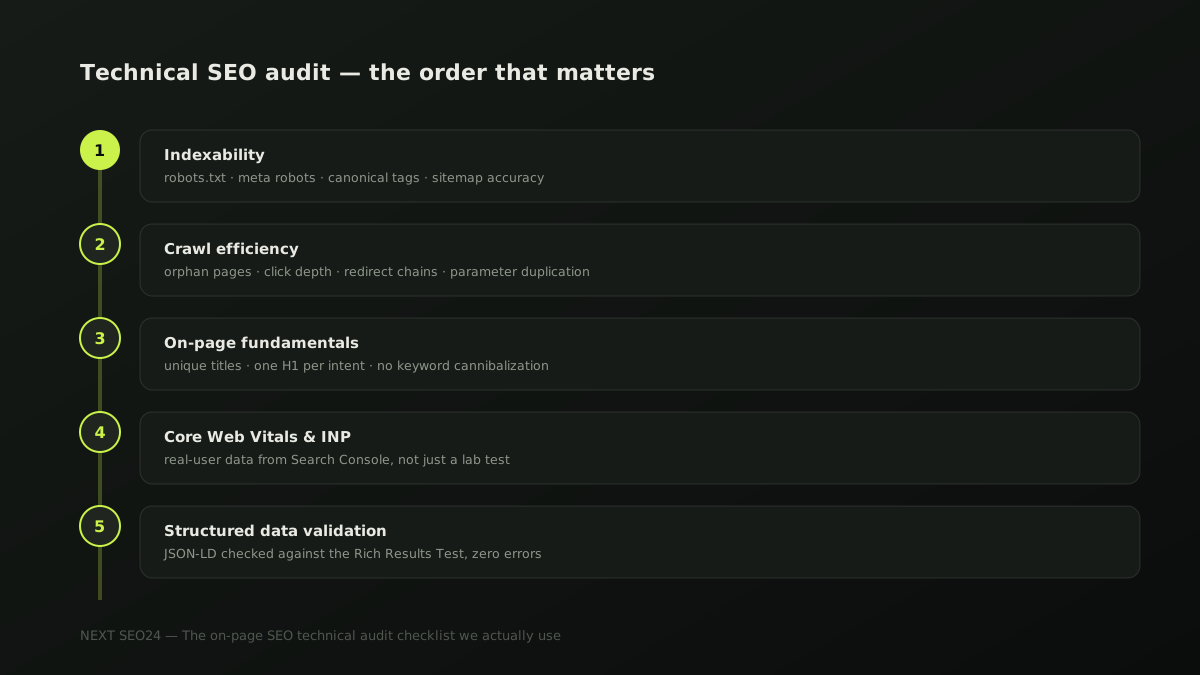
If you fix a slow homepage before fixing a canonical tag that's telling Google to index a completely different URL, you've just made a faster page that still won't rank. Every audit we run follows the same five-stage order, because each stage can silently undo the value of the ones after it. Skip ahead, and you'll polish work that never had a chance to matter.
Step 1 — Indexability, before anything else
Check, in this order: robots.txt isn't blocking pages it shouldn't (a shockingly common launch-day accident); meta robots tags aren't set to noindex on pages meant to rank; canonical tags point to the URL itself, not a competitor page or a stripped-down parameter version; and the XML sitemap only lists indexable, 200-status URLs — not a mix of redirects, 404s and canonicalized-away pages, which quietly erodes Google's trust in the whole sitemap.
<!-- Bug we find constantly: a page canonicalizing to the homepage
     instead of itself, usually left over from a CMS default -->
<link rel="canonical" href="https://example.com/">

<!-- Should read: -->
<link rel="canonical" href="https://example.com/services/backlinks">
This single bug — a wrong self-referencing canonical — can silently remove an entire service page from Google's index while every other signal on the page looks perfectly healthy. It's the first thing we check, precisely because nothing else on this list matters if it's present.
Step 2 — Crawl efficiency
- Orphan pages. Pages with no internal links pointing to them are hard for Google to find and rarely rank, even when indexed. We crawl the site and cross-reference against the sitemap to find them.
- Click depth. Important pages buried more than 3-4 clicks from the homepage get crawled less often and pass less internal authority. Category and service pages should sit close to the top of the structure.
- Redirect chains. A URL that redirects to a redirect to a redirect wastes crawl budget and dilutes link equity at every hop. We flag anything longer than a single 301.
- Parameter duplication. URLs like
?utm_source=,?sort=priceor session IDs can create dozens of near-duplicate indexable URLs from one real page if canonicals aren't handling them correctly.
Step 3 — On-page fundamentals, done properly
Once Google can find and index the right URLs, we check that each page is actually about one thing: a unique, descriptive title tag under roughly 60 characters; exactly one H1 that matches search intent, not the brand name repeated on every page; a meta description that earns the click rather than restating the title; and no two pages competing for the same primary keyword — a problem we see constantly on sites where a blog post and a service page both target "SEO services Malaysia."
Step 4 — Core Web Vitals and INP
Speed and interactivity get checked after indexability and structure, not before — a fast page that Google can't find is still invisible. For the full method we use here, see our dedicated Core Web Vitals and INP speed checklist, which covers the practical fixes in more depth than fits here.
Step 5 — Structured data validation
Last, we validate every JSON-LD block against Google's Rich Results Test and check it matches visible page content exactly — mismatched or broken schema is a policy risk, not just a missed opportunity. Our FAQ and HowTo schema implementation guide has working code examples if you're building this from scratch.
Mistakes we see repeatedly on Malaysian SME sites
- Hreflang errors on multilingual sites. A site serving English, Bahasa Malaysia and Chinese versions of the same page often has hreflang tags pointing to the wrong URL, or missing the required self-referencing tag — which can cause Google to show the wrong language version in search results.
- WordPress plugins fighting each other. Two SEO plugins active at once, or a caching plugin serving stale canonical tags, is one of the most common causes of indexability bugs we find during migration audits.
- Soft 404s. A "page not found" message that returns a 200 status code instead of a real 404 confuses Google into indexing dead pages, diluting the site's overall quality signals.
- Blocking CSS/JS in robots.txt. Google renders pages like a browser to judge quality and Core Web Vitals — blocking the resources it needs to render properly is a self-inflicted wound we still find on older sites.
A pre-publish audit checklist
- Robots.txt and meta robots checked page by page, not just at the site level
- Every important URL self-canonicalizes correctly
- XML sitemap contains only 200-status, indexable URLs
- No orphan pages, no redirect chains longer than one hop
- Hreflang tags verified for every language version, including self-reference
- Core Web Vitals checked in Search Console's real-user data, not just a lab test
- All structured data passes the Rich Results Test with zero errors
If you'd like us to run this exact audit on your site, send it over — we'll tell you specifically what's blocking you, not hand back a generic scorecard.
Frequently asked questions
How often should a website run a full technical SEO audit?
A full audit once or twice a year is enough for most SME sites, plus a lighter monthly check of crawl errors, index coverage and Core Web Vitals in Search Console. Audit immediately, outside that schedule, after any redesign, platform migration, or a sudden traffic or ranking drop.
Can I run a useful technical audit without paid tools?
Yes, for most of the checklist. Google Search Console (free) covers indexability, crawl errors and Core Web Vitals. Browser dev tools and view-source cover canonical tags, meta robots and structured data. Paid crawlers like Screaming Frog earn their cost mainly on larger sites, for finding orphan pages and redirect chains at scale.
What's the single highest-impact fix to start with after an audit?
Indexability problems first, always — a page that's blocked, canonicalized away, or noindexed can't rank no matter how good the content is. Fix those before touching content quality, internal linking or Core Web Vitals, since none of that work matters on a page Google can't index.
Want your site audited using this exact process?
Send us your site and we'll run the full five-stage audit — indexability, crawl efficiency, on-page, speed and schema — and tell you what's actually blocking your rankings.
Chat on WhatsApp →